
Know how service is running in real time.

LRS WaitList Express keeps your waitlist, quoted times, pager notifications, and guest-facing displays together in one live workspace. Hosts add and page guests in seconds, and managers can see exactly how the floor is moving.

  • Live waitlistEvery add, page, and seat syncs instantly across every screen.
  • Pager notificationsPage guests on LRS pagers with one click, and track every notification.
  • Built for busy hostsQuoted times, elapsed-time meters, and workflows keep the next step obvious.
Light & Dark mode supported
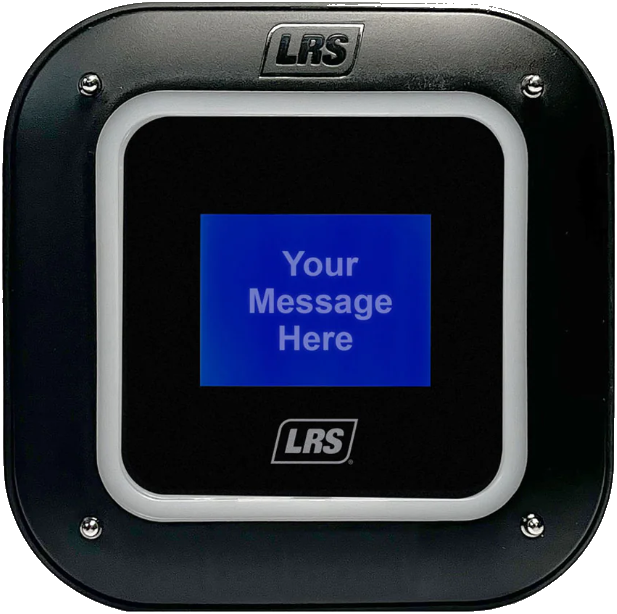
LRS CS8 Alpha Coaster pager YourMessageHere

Compatibility note: Guest paging in LRS WaitList Express works with LRS guest and staff pagers, including Alpha Coaster and Alpha Staff Pagers, and requires an LRS transmitter with internet access.

How It Works

A live waitlist built to keep the floor moving.

Hosts add guests, quote wait times, and page parties from the same screen, so nobody has to juggle clipboards, pagers, and spreadsheets during the rush.

Add guests in seconds and quote with confidence

The add-guest form is designed around your floor. Capture the details that matter, quote a wait time, and assign a pager without leaving the list.

  • Capture name, party size, quoted time, and pager number.
  • Add your own fields such as seating preference or special occasion.
  • Search, sort, and filter the list as it grows.
Add Guest
Martinez
−4+
104
10 min15 min25 min45 min
Birthday
CloseAdd to WaitList

Page guests the moment their table is ready

Send a pager notification from the guest's row. The menu closes immediately, a toast confirms delivery, and the row records each notification and when it was sent.

  • Notify guests on LRS Alpha Coaster and Alpha Staff Pagers.
  • Optionally send a confirmation message when a guest is added.
  • See notification counts and the last time each guest was paged.
Guest Actions
MartinezParty of 4 • Pager 104 23:01
Send notification Seat guest Edit guest Remove
Pager 104 notifiedMartinez • 7:42 PM

Workflows that move every guest forward

Workflow buttons walk staff through your service steps, from check-in to seated, and can send notifications along the way. Automatic removal keeps the list clean when guests leave.

  • Build multi-step workflows with optional notification messages.
  • Show each guest's current step right in the list.
  • Remove completed or stale entries automatically on your schedule.
Workflow
  1. 1Checked in7:19 PM
  2. 2Table pagedPager 104 • 7:42 PM
  3. 3SeatedWaiting on host
Complete step3 / 3 • Seated
Guest-Facing Displays

Let guests check in and follow the line themselves.

Turn a tablet into a self check-in kiosk or put the live line on a lobby screen. Both stay in sync with the host stand and lock behind a passcode.

Kiosk Mode for self check-in

Guests add themselves to the list from a lobby tablet using the same fields you designed, which frees your host stand during peak hours.

  • Choose which fields appear on the kiosk.
  • Show your own logo and brand colors.
  • Exit is protected by a 4-digit passcode.
Bistro 42

Join the waitlist

Jordan
−2+
Add me to the list Current wait about 20 minutes

Status Board for the lobby

A full-screen board shows who is up next and who is ready, so guests know where they stand without asking the host.

  • Updates live as guests are added, paged, and seated.
  • Choose exactly which columns guests can see.
  • Works on any browser-connected TV or monitor.
Bistro 427:42 PM
Ready now
Martinez 104 Chen 111
Up next
Okafor 117 Patel 122 Harper 126
Dashboard & Reporting

See how service is performing, today and over time.

The dashboard turns every add, page, and seat into numbers managers can act on, and Advanced Reporting delivers them to the right inbox on schedule.

A live dashboard for the shift

Track parties, guests, wait times, and quote accuracy as they happen. Weather tracking adds context to busy and quiet days.

  • Average wait compared with quoted time.
  • Hourly volume to plan staffing.
  • Local weather recorded alongside each day.
Dashboard
Parties today86 Guests241 Avg wait18m Quote accuracy94%
4 PM☀ 74°F Clear12 AM

Advanced Reporting delivered on schedule

Build the reports your team needs and send them automatically by recipient and cadence, so the numbers arrive before the morning meeting.

  • Schedule daily, weekly, or monthly delivery.
  • Send to managers, owners, or regional teams.
  • Review recent report runs and their status.
Advanced Reporting
Daily service summaryEvery day • 6:00 AMActive
Weekly wait-time trendsMondays • 7:00 AMActive
Monthly volume by hour1st of month • 8:00 AMPaused
Last run sent to 3 recipients • Today 6:00 AM
Realtime syncEvery screen updates the moment the list changes.
Notification historySee who was paged, how often, and when.
Completed guestsReview completed and removed parties at any time.
System healthDatabase, storage, and transmitter status at a glance.
Admin Tools

Make the waitlist yours, and connect it to everything else.

Design your form, manage users and preferences, monitor transmitters, and connect other systems through the API, all from one place.

WaitList Designer

Choose exactly what your team collects and what appears in the list, on the kiosk, and on the status board. No code required.

  • Text, number, dropdown, date, and formatted input fields.
  • Elapsed-time meters and workflow buttons.
  • Control where each field appears and in what order.
WaitList Designer
Fields Text fieldNumberDropdownDateWorkflow button
Form Layout Name Party sizePager # Quoted time Seating preference

API Integrations with built-in examples

Connect online check-in, POS, or internal dashboards to the live waitlist with managed API keys and ready-to-run code samples.

  • Create, reveal, and revoke API keys from one screen.
  • Try each operation live with an interactive request runner.
  • Copy code examples for the exact operation you need.
API Integrations
GET /api/live-waitlist/{userId}/api-key?location_id={locationId}
Authorization: Bearer wlx_live_••••••••

{
  "guests": [
    { "name": "Martinez", "partySize": 4, "pager": 104 },
    { "name": "Chen", "partySize": 2, "pager": 111 }
  ]
}
Key Features

Everything a busy front of house needs.

From account setup to licensing and transmitters, WaitList Express covers daily service without losing the controls managers need over time.

Account Setup

Sign up, invite users by email, and let them activate their own accounts with a secure password link.

Roles & Preferences

Decide which pages and settings each role can reach, and tune behavior for your location.

Transmitters

Register LRS transmitters, check their status, and confirm paging is ready before service starts.

Company Profile

Add your logo and company details so kiosks, boards, and emails look like your brand.

Light & Dark Mode

Switch themes per screen to match a bright host stand or a dim dining room.

Flexible Licensing

Turn on Kiosk Mode, Status Board, Advanced Reporting, API access, and weather tracking as you need them.

Start running a calmer, faster waitlist.

Create an account to set up your location, or log in to pick up where your team left off.